I built these tools for myself because I wanted to have a robust, meaningful way of testing page templates how well it scored for just that, URL accessibility. I’ve decided to make these tools available for anyone who wants to test it either locally, or within your browser. As a big proponent to both the open source community and the search community, these tools will remain always free. I will endeavour to update them often and securely to move with our ever changing industry.
Why this is the most important thing to start doing first
Crawler access is the prerequisite everything else in AI visibility depends on. Content quality, entity associations, and citation building are all legitimately important work, but they become irrelevant if the crawler cannot reach the page. A lot of AI visibility work ignores this layer entirely.
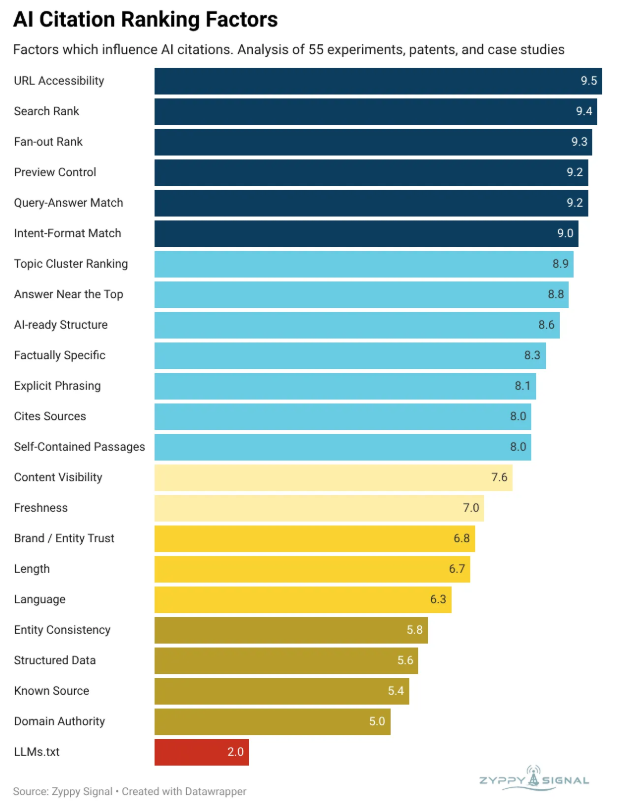
My friend Cyrus Shepard who works tirelessly to create some of the most helpful testing and studies in SEO recently published a study synthesising 55 experiments, patents, and case studies on AI citation ranking factors. And the #1 factor, scoring 9.5 out of 10, is URL Accessibility.
Pages can be invisible to AI systems while appearing completely healthy to a browser. This was the basis for necessity of these tools because with strong organic visibility, well structured content, queries our grounding classifier rates as high probability grounding candidates, the LLM did not select any of it in its results. Which means the LLM’s grounding snippet extraction tool pulled nothing. The selection model never gets the chance to evaluate the content, because the page isn’t making it into the grounding pool in the first place.
The cause, more often than not, is infrastructure blocking that nobody set up intentionally and nobody has checked since.
Why access is the zero-level prerequisite
The page has to be reachable before any of the interesting optimisation work matters for primary bias, selection rate, grounding chunk quality, all of it comes after access.
The AI visibility pipeline runs in a specific sequence:
A query triggers grounding, or doesn’t (our grounding classifier gives you this probability)
Google runs fanout queries and retrieves a grounding pool from its content store
The system trims each source down to grounding chunks, averaging around 377 words per source, within a fixed 2,000 or so word budget across the whole pool
The model generates its answer, applying citations to the chunks it used
A page blocked at step 2 exits the pipeline entirely. There are no grounding chunks to evaluate, no selection decision to make. The content never enters the pool.
Infrastructure blocking is the most common cause, and it typically goes undetected. WAF rules, security plugins, CDN configurations, and server middleware were set up years ago before GPTBot and OAI-SearchBot existed as tokens anyone needed to consider. Those rules blocked “bots” generically. They still do.
Google’s AI Mode retrieves content from a proprietary content store that is separate from the search index, not always from the live web during query fanout. I found in my research that a page can be indexed, ranking, and returning 200 to a standard browser, while still failing to fetch inside the AI Mode execution environment. Neither the browser check nor a standard SEO crawl will surface this. You need to test the actual bot user agents.
Two tools, one job
Install: Chrome Web Store (AI/SEO Bot Crawl Pro)
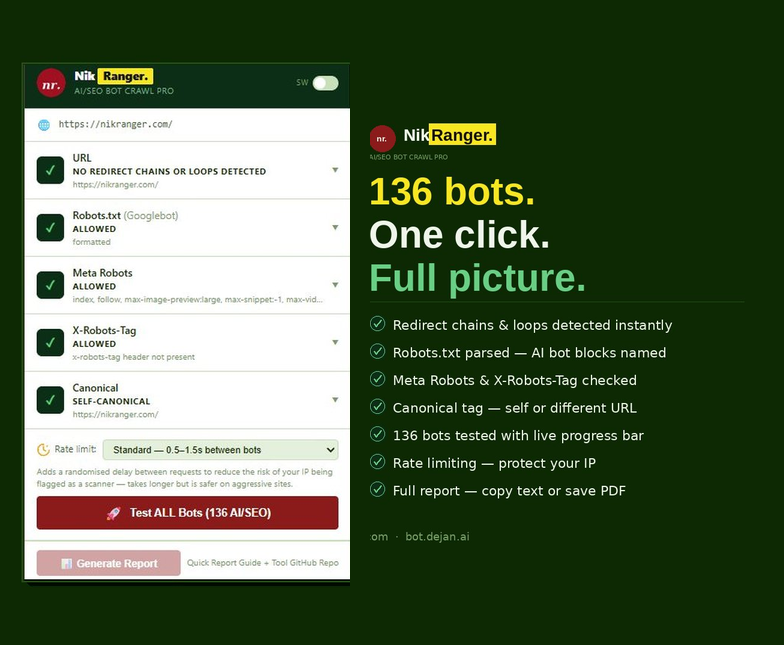
Chrome Extension: AI/SEO Bot Crawl Pro
Install once, works on any page. Passive signals (redirect chains, robots.txt status, meta robots, X-Robots-Tag, canonical) load automatically when you open the extension. One button fires live requests against 136 bots with a real-time progress bar.
Install: Chrome Web Store (AI/SEO Bot Crawl Pro)
GitHub Tool: Streamlit Web App
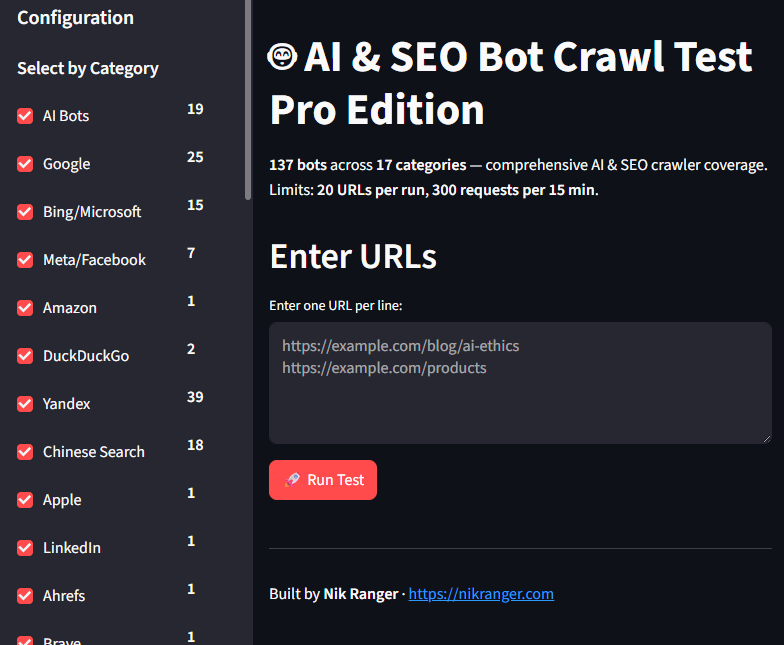
Paste multiple URLs, test all 137 bots in a single run. Includes a full AI Visibility Analysis panel, per-page health scores, and three CSV export formats. Self-hostable or use the live version.
Live tool: bot.dejan.ai Source code: github.com/dejanai/bot-crawl-test-pro
DDoS proof, built in
Rate limiting built in.
I run my local streamlit app all the time, sometimes for a lot of URLs pasted into it so I can get all of the site’s templates for a report. So I built it so there’s a per session request budget and hard caps on how many URLs and how many agents a single run can include, so you cannot accidentally launch thousands of requests at a target in one go.
My chrome extension’s serial design throttles it for the same reason, since one request at a time is gentle by nature. That way, the app doesn’t kick the hornets nest of the very servers you need continued access to.
Input handling is locked down.
In the local app, URLs are validated against an allowlist of http and https schemes, oversized payloads and control characters are rejected, and requests to private, loopback, and cloud metadata addresses are refused, so the tool cannot be turned toward internal infrastructure. Redirect depth is capped so an open redirect loop cannot run away with it, SSL verification is on by default, and there are no secrets baked into the code.
On the extension side, the user agent rewrite is scoped to the extension’s own background requests, so your normal browsing in other tabs keeps your real user agent the whole time a test is running. Sensitive response headers such as set-cookie and authorisation are stripped before anything is stored or exported.
What about fingerprinting?
Spoofing a user agent using the local app changes one signal. A modern WAF also looks at the TLS handshake, HTTP/2 frame ordering, header order, and client hints, and it can use any of those to tell a real crawler from a spoof.
The extension removes the chrome client-hint headers, the sec-ch-ua family, so your request does not openly contradict the user agent you set, which clears up the easiest mismatch.
The result tells you how a site treats a given user agent string, which really is the main question. It does not prove you could impersonate that crawler perfectly end to end and a server that fingerprints deeper may still distinguish the genuine bot from your test. Treat a clean result as strong evidence about user agent handling, and treat a server’s deeper behaviour as a separate question for the cases where it matters.
Your glorious dedicated IP address
Having your own dedicated IP address is awesome. Take it from me, if you’re going to use whitelisting as leverage, the address you test from needs to be stable.
The cleaner path is a dedicated, static IP you can give a client with confidence. That might be a fixed business line from your ISP, a small always on machine at a known address (like your homelab machine running proxmox for example), or a VPS you route your testing through. Once you’ve whitelisted your dedicated IP address, your tests become reproducible and your ongoing access stays predictable. The request you make to them means only one IP to allow, with a clean before and after to show exactly what it changes. Security teams don’t like to be bothered too much, so let’s not give them dynamic rolling IPs and ask them to trust a moving target. Won’t happen and you’ll lose ground in a meeting.
Final thougths
Getting crawl access is essential, it’s your foundations which you build your schema, content and links. Test it from a vantage point that matches real life as best you can, keep your request volume polite enough that you stay welcome on the servers you depend on, and give the client a stable address they can trust. Have fun and stay hydrated. Enjoy!