Product Feed Validation (Alibaba Case Study)
Thank you team Alibaba for permission to share data. <3
Alibaba’s google merchant centre is by far the largest client I’ve ever audited, which makes sense considering they’re the largest wholesale B2B eCommerce platform in the world. This is an interesting case study because it highlights how issues that affect products affect feed validation at scale.
Alibaba’s google merchant centre feed doesn’t contain all of their products, but I’m sure they’d like it to. Out of their 220M products they offer at any given time, they have millions of products vying for attention on google’s merchant centre, and a significant chunk of these are either not showing at all or are showing with avoidable problems baked into the feed.
I built my own custom python scripts and streamlit dashboard using Google’s third-party app developers guide if you’d like to build a similar dashboard for your own brand or client.
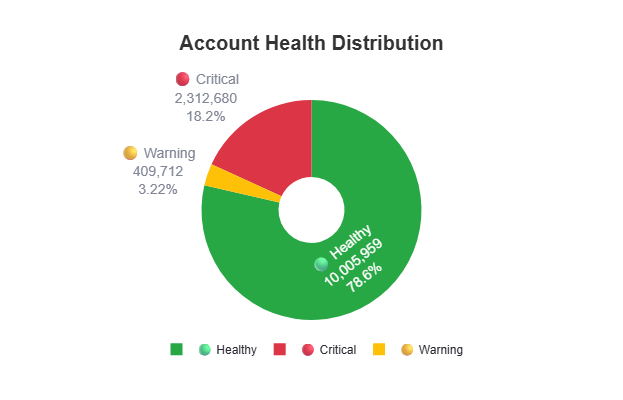
How the audit was run and what the numbers actually mean
Normally for an enterprise MCA structures like Alibaba, I’d use the GMC Data Transfer Service for BigQuery, which natively dumps the entire productstatuses and itemLevelIssues tables directly into a BigQuery data warehouse every 24 hours. This helps bypass any API rate limits, require zero local processing power, and can query all 220M products with a SQL statement, but this would require permissions and resources which we didn’t get.
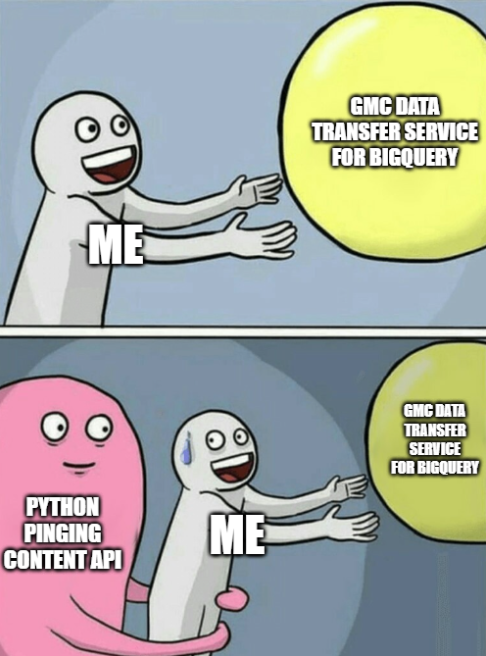
Crazy, I know but what on earth do you do when you’re blocked and still want to help their team sort through the issues meaningfully? I decided to go the python route and make 600K separate API calls, rate limited which took some time (2.5 weeks). My diagnostic runs in two phases using the Google Content API v2.1. I leaned on the legacy API even though it’s slated for sunset in August of this year 2026. While the newer Merchant API does have equivalent product endpoints now (specifically accounts/{accountId}/products and accounts/{accountId}/aggregateProductStatuses), its underlying architecture fundamentally splits product inputs from processed statuses differently than v2.1. Rebuilding our MCA extraction logic to match the new Merchant API structure mid-audit wasn’t feasible, so relying on v2.1’s familiar aggregation was the most efficient path forward. Sometimes you have to think outside the box and work with the tools at your immediate disposal, right?
Phase 1 was at the sub-account level to give a clear overview, scraped from the MCA to show in a single API call to pull a small sample of products per account and check whether the product’s destination is disapproved, pending or clean. Normally this wouldn’t be the way that this’d be done, I’d be able to scrape everything then use the product issue count to look at how many sub-accounts were impacted but at the scale of 220M products across 595,348 sub-accounts.
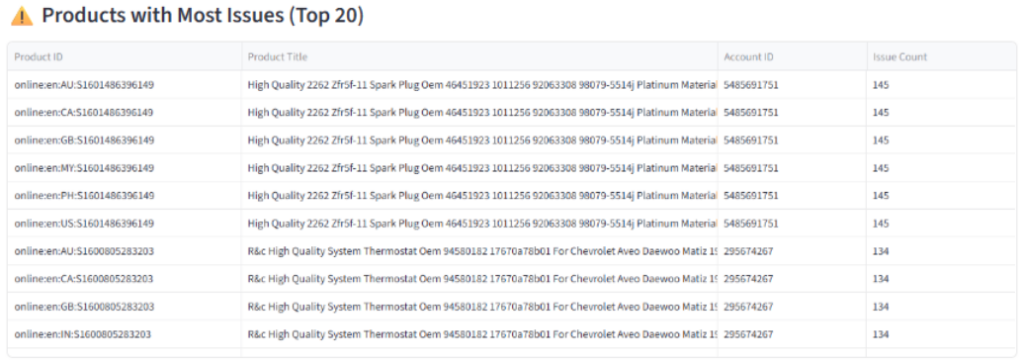
Phase 2 diagnostic is at the product to focus on the accounts that were flagged as critical in Phase 1 to then fetch all products. For all products, itemLevelIssues extracted from the productstatuses response found 22.7M products with 40.9M issues across 97 unique issue types. I built a secondary script to identify the remaining accounts and scrape the products from them. Accounts that only had warnings and healthy products were not scraped so the 40.9M issue count is technically a lower bound, not a total.
How to prioritise
The instinct is to fix the most severe issues first but at Alibaba’s scale, severity doesn’t tell the whole story you need to cross it with fixability and account blast radius, for lack of a better word.
An issue that’s severe but affects 12 products and requires a Google legal review isn’t your first call. An issue that’s severe but affects 200,000 products and can be fixed by updating a feed attribute is.
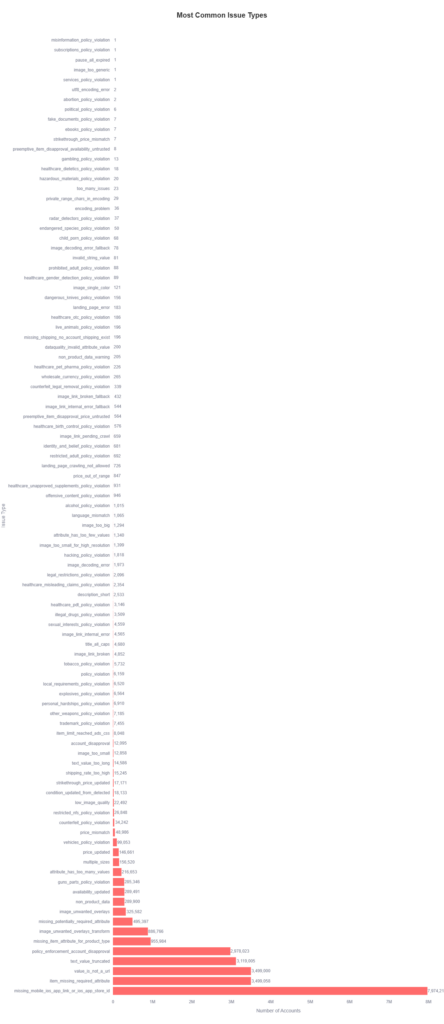
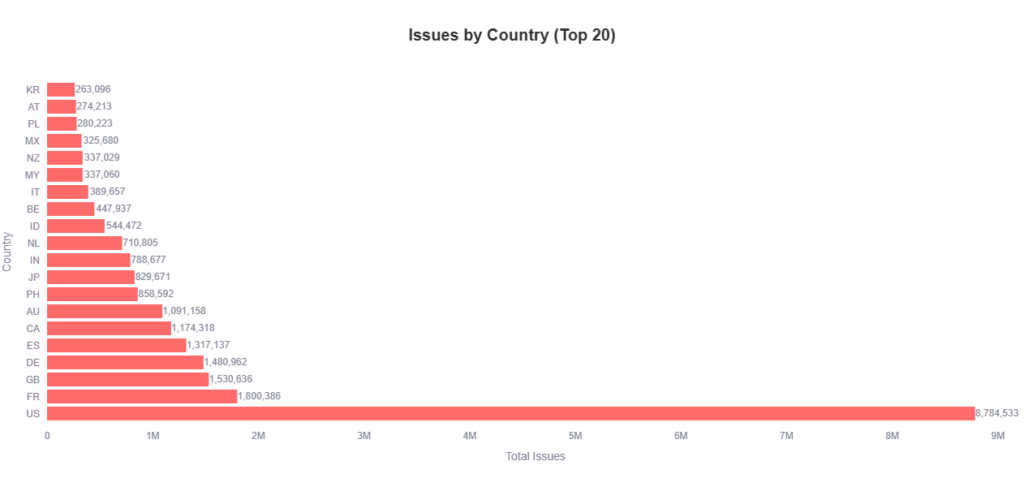
Wave 1: Stop the bleed and address account level issues first
Issues that suppress the whole account should be the first you address, because when an account is suspended or disapproved, all of the products contained are essentially invisible.
[account_disapproval_products] and [policy_enforcement_account_disapproval_products]
Before acting on either of these, the first thing I needed to establish was the nature of the disapproval, not just where the flag was surfacing. This is important because having policy_enforcement_account_disapproval at the item level doesn’t mean the account is merely flagged at the product level, while otherwise healthy. So when an account level suspension or warning happens, the way it works is that Google cascades that status down to item level so that ad serving halts immediately across affected destinations. Seeing this in itemLevelIssues means the sub-account is already impacted. If that’s a bit confusing, I asked claude to infographic this up to explain it::
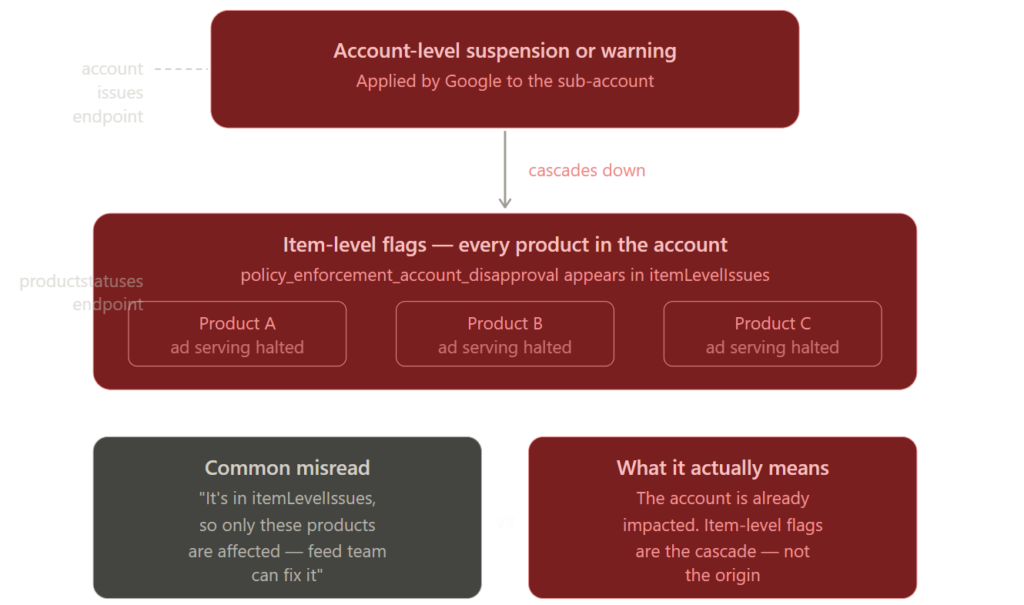
Treating it as a product level feed fix and routing it to the feed team without escalation is the wrong call, and a potentially costly one at this scale.
A genuine hard account suspension will typically stop the account returning product data via the API altogether, or surface flags in the account issues endpoint. These are the real account killers, every product in those sub-accounts are dead regardless of product quality, and Google’s reinstatement process requires a formal appeal.
When I raised this with their shopping feed team, one of the first questions I was asked was whether we could ignore it and create new, better feeds instead. It’s a question I get fairly regularly with enterprise MCAs and unfortunately, the answer is no. The reason isn’t a “reputation score” issue. The actual risk is a parent MCA suspension, which takes down every sub-account, which would be game over for all product revenue on Google Shopping. For the largest wholesale retailer in the world, safe to say, that would massively impact their bottom line and make a lot of stakeholders very unhappy. Nobody wants that!
[item_limit_reached_ads_css_products]
This is generally fixable without Google involvement, but before you get into it a really important caveat to keep in mind is that removing low value or duplicate listings are the last resort, not the first step. My approach here is custom label segmentation, defining which SKUs are prioritised for submission within the cap, typically the highest margin, best converting, or highest traffic products. I didn’t get data about highest margin or best converting, so I went with highest traffic. I needed some way of a litmus before recommending any decisions because removing listings has downstream consequences for organic shopping performance and conversion history that delisting doesn’t recover easily.

That being said, when a quota increase is genuinely warranted, it’s worth understanding what you’re actually requesting. Account item quotas are a GMC infrastructure limit, not something negotiated at the CSS partner level. The standard path is a quota increase request submitted directly through GMC support or google’s technical quota request form, based on account architecture health. A CSS partner can facilitate that process, but the quota sits with GMC infrastructure, routing it as a CSS negotiation sets the wrong expectation and typically adds unnecessary delay. Reinc in google cloud forum has helpful screenshots for this process so you know what to click.
[pause_all_expired_products]
When you see this, it’s a feed expiration issue, not a campaign or billing problem. It fires when products have passed their expiration_date attribute value, or when products have not been updated within GMC’s 30 day expiry window, causing them to be marked inactive.
At Alibaba scale, the diagnosis needed to match their massive architecture. An operation with 220M total products, with 22M live at any given time is not running a scheduled fetch pulling an XML or csv over HTTP, that’d time out instantly. The feed pipeline here is either pushing via the content API and in this case, also ingesting via google cloud storage. If products are expiring at volume, which was our case, the cause to me was going to be one of two things:
- the API is failing to push expiration_date updates for a subset of SKUs
- or the delta update logic is silently abandoning products that haven’t changed recently, letting them age out of the 30 day window without a refresh
Fun fact, there were so many issues deployed by different teams across Alibaba’s departments that it turned out to be both. Hurrah. So the fix for us was in the API pipeline, not the fetch schedule, which meant I’d audit the delta update logic first, confirm which SKUs were being dropped, and determine whether expiration_date is being explicitly set or whether the pipeline is relying on implicit refresh to keep products active.
Wave 2: Illegal / harmful content
The only reason why this isn’t in wave 1 is because it was a known issue and requires the most nuance. The difficulty with issues like these is because with marketplaces, this is a seller vendor violation, not an Alibaba platform violation. Google sees these products and disapproves at the product level, not the MCA level unless there’s systemic abuse.
A custom Python script was used to filter through and identify how many sub-accounts were affected, and how many products per account. An account with 1 product flagged for guns_parts_policy_violation_products is very different from an account with 10,000.
Issues like [tobacco_policy_violation_products], [alcohol_policy_violation_products], and [gambling_policy_violation_products] are often the easiest to triage, usually it’s a country level issue, where products may be legal in the seller’s country but restricted in certain destination markets. The fix is to use excluded_destination at the product level to exclude specific programmes (shopping ads, display ads) in the affected countries, or remove those countries from the account’s target country settings entirely if the restriction is broad enough. At Alibaba’s scale, the choice between those two instruments came down to how many products were affected and whether the account legitimately traded in other markets.
Issues like [explicit_policy_violation_products], [fake_documents_policy_violation_products], and [counterfeit_policy_violation_products] are more complex, and the instinct to immediately suspend the sub-accounts needs to be tempered with one important step first of ruling out false positives. GMC’s automated enforcement has a well documented false positive problem, standard medical supplies flagged as explicit content, legitimate branded goods flagged as counterfeit, and similar misclassifications are common enough at this scale to be a material concern. The correct approach here would’ve been to use the productstatuses endpoint to identify which flags are likely false positives. Because there isn’t a dedicated one by one product appeal method in the API, the programmatic way to handle this at scale is to use the freelistingsprogram.requestreview or shoppingadsprogram.requestreview methods to trigger account level appeals, use the newer MerchantSupportService in the Merchant API, or simply force a bulk feed re-upload to trigger Google’s automated re-evaluation before making any permanent suspension decisions. For lower volumes, you’d just hit the Merchant Center UI.
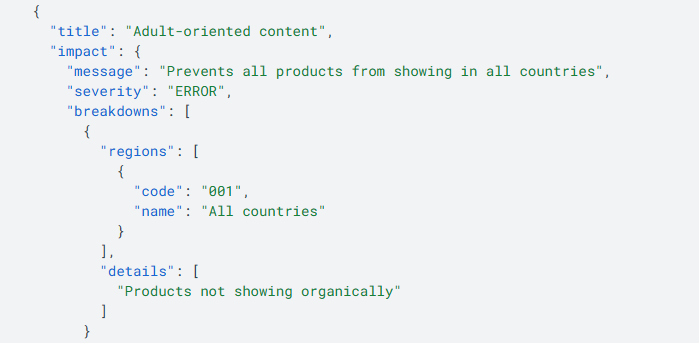
My team and I recommended a review of their feed level policy layer that screens products against prohibited category keywords and destination country restrictions before submission to GMC. The reason this is also in wave 2 is that it’s a platform level fix, not a one by one product fix, so we can address these at scale but that layer needs to be calibrated carefully to avoid replicating the same false positive problem upstream.
Wave 3: High volume product disapprovals
These are the product level issues that can be fixed at feed scale, and helpfully where the bulk of the recoverable revenue lives. When working through these issues, helpfully fixing one issue on one product solved multiple issues across many country codes, but I’ll go through each of the issue themes.
Landing page issues [landing_page_error_products] and [landing_page_crawling_not_allowed_products]
Landing page issues are extremely common on marketplace platforms. For landing_page_crawling_not_allowed_products, the priority is establishing what Google’s own crawler actually sees, not what a generic bot sees. WAFs like cloudflare and akamai are specifically configured to block unknown bots while whitelisting google’s crawler IP ranges and user agents, so a third party crawl tool will return a false picture. The correct diagnostic tools here are GSC’s URL inspection tool and google’s rich results test, both of which render the page from google’s perspective. In a lot of these cases it was a whitelist issue at the CDN/WAF rule level that was catching legitimate googlebot traffic. I went through and identified the dead links and they were subsequently recommended to be removed from the feed entirely.
Price issues [price_mismatch_products], [price_out_of_range_products], [strikethrough_price_mismatch_products], [preemptive_item_disapproval_price_untrusted_products]
I found two distinct causes that required two different fixes.
- First, feed sync lag, where the feed was updating on a slower cadence than the live product page.
- Second and more prevalent was a seller side promotions and dynamic pricing, where sellers were applying temporary discounts directly on their vendor pages that the feed pipeline never captured, because the feed was generated from base price data rather than live PDP state.
Increasing feed refresh frequency doesn’t fix the second problem. The correct fix is implementing sale_price and sale_price_effective_date attributes in the feed to explicitly communicate promotional pricing to GMC, rather than letting GMC discover the discrepancy when it crawls the live page.
[strikethrough_price_mismatch_products]
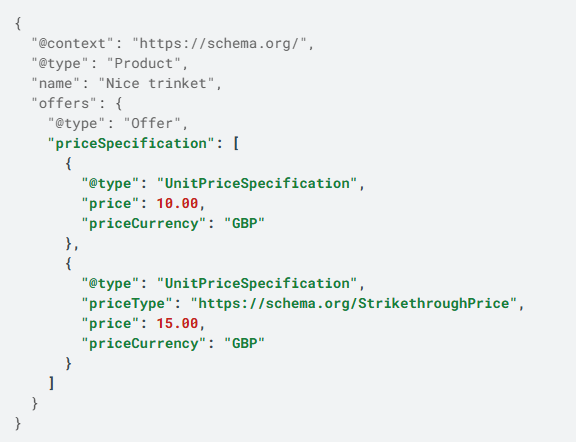
Strikethrough prices, which Google added schema examples and documentation for back in Febraury 2025 is different enough to mention here as it has its own distinct validation. The feed attribute relationship, where the sale_price genuinely lower than price by a threshold GMC considers a real discount, with a valid sale_price_effective_date is necessary but not enough. From my experience, the piece that catches most people out is google’s historical pricing rule, where the base price must have actually been charged for a minimum of 30 non-consecutive days within the past 200 days. If the seller hasn’t legitimately sold at that base price recently, then google will reject the strikethrough regardless of how cleanly the feed attributes are formatted. Here, I recommended to fix the attribute pair together, validating the pricing history first or the attributes won’t matter.
Missing/invalid attributes [item_missing_required_attribute_products], [missing_potentially_required_attribute_products], [dataquality_invalid_attribute_value_products]
Simply, these are feed quality issues. Take a look at your affected products to find out which specific attributes are missing like the GTIN, brand, condition, and so on. I made recommendations for Alibaba’s catalogue team to enrich the affected SKUs, so that the rollout was prioritised by highest traffic product categories first, which gave the remediation some useful structure.
Image issues [image_link_broken_products], [image_too_small_products], [image_unwanted_overlays_products], etc.
Diving into the csv output, the majority of image URL failures were from CDN and hosting issues. Figuring out the root cause though, wasn’t straight forward.
Query string parameters in image URLs aren’t the problem because GMC processes URLs with query strings without any problems. I’ve done a few now to know that image problems on CDNs at this scale are almost always caused by the CDN serving a web page wrapper instead of the raw image binary, dynamic rendering failing for Googlebot-Image, or incorrect content-type headers on the response. A URL sanitisation pass should check for protocol relative URLs, which are valid in browsers but invalid in feed validation, but the CDN configuration and response headers are where the real diagnostic work needs to happen. This part is still being worked through as many departments require oversight for vendor communication but the recommendations for this are to have separate vendor policy rules updated to address overlay violations, requiring sellers to re-submit images without text or watermarks.
Wave 4: Data quality and visibility
Lastly, for wave 4 these are the issues that are important to fix, but not urgent. They won’t cause disapprovals but will hit a performance ceiling if left unchecked.
[title_all_caps_products]
Before reaching for a custom engineering solution here, it’s worth flagging that GMC has a built in feature that handles exactly this with Automatic Text Improvements. When enabled at the MCA or sub-account level, google’s own machine learning normalises capitalisation automatically and critically, it already recognises global brand acronyms and product naming conventions without the merchant needing to build and maintain an exhaustive exclusion list across millions of products. At Alibaba’s scale, that’s a meaningful amount of engineering time saved. I recommended enabling this at the MCA level as the first step, with a monitoring period to validate output quality across the top product categories before considering any supplementary custom logic.
[description_short_products]
This wasn’t something we could fix directly, individual vendors are responsible for uploading content for their own products. Instead, we encouraged Alibaba to incorporate a vendor scorecard that scores overall vendor subdomains and individual PDPs, creating an incentive structure for sellers to enrich their own pages. To help prioritise outreach, we suggested leading with wholesale electronics and fashion, as those categories have the highest density of thin descriptions at Alibaba’s scale and the highest recovery value.
[language_mismatch_products]
This was straightforward to address programmatically, which is always music to everyone’s ears. Using query classification and country level filters, I was able to identify all instances where the declared product language didn’t match the target country. For a marketplace with sellers submitting in multiple source languages, this is a pipeline mapping problem as much as a content problem, the check established whether language was being declared correctly in the feed before assuming the content itself needed to change.
[encoding_problem_products] / [utf8_encoding_error_products]
This is feed sanitisation at ingestion. The required fix was encoding validation at the point products enter the pipeline, not at the export step. Catching encoding errors downstream means corrupted data has already propagated through the catalogue and by that point, you’re cleaning up a mess that should never have been created. But with everything else in consideration, it wasn’t a huge surprise to find these types of issues here.
Where to start for your own product feed diagnosis
I asked claude to create the infographic because with a project of this size and complexity, I needed to communicate how we were going to address this to stakeholders. What is operationally helpful for C suite isn’t always useful for every team, communicating these ideas to engineering is completely different as it still prescribes SMB fixes (scheduled fetches, custom title normalisation, redundant crawling) to enterprise problems, we needed to still work together to leverage Google’s native ML tools, API functionality and BigQuery infrastructure – all things I as an external strategic lead consultant, had no access to. You hopefully are internal or have permissions so you’ll have a different experience with the diagnosis and comms.
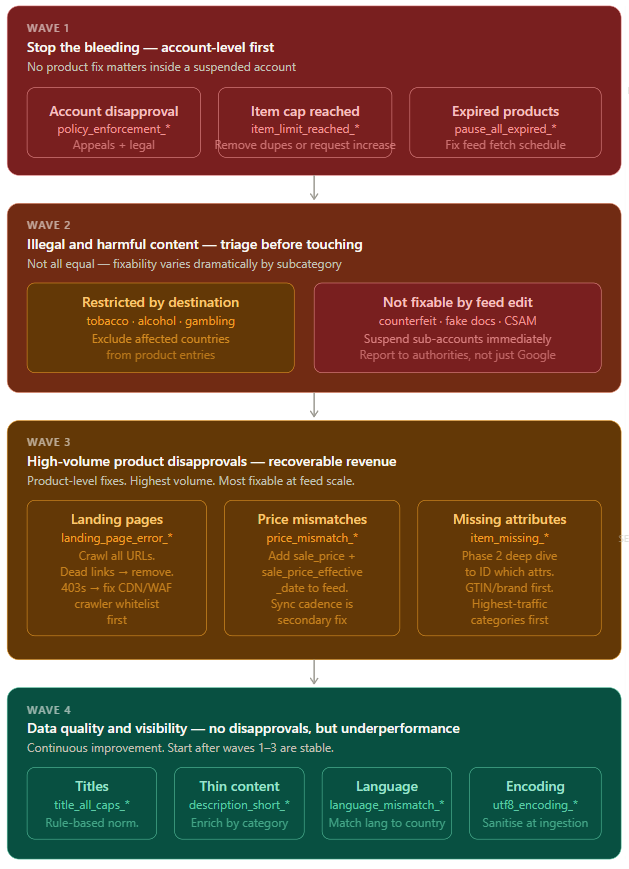
One final note before I go, before any remediation work is implemented at scale, it’s really important to first confirm if the feed fetch schedule is active and the fetch frequency is appropriate for the update cadence of the product catalogue. That’s because the feed pipeline changes that get overwritten on the next scheduled fetch are not fixes. We don’t want to waste precious engineering time, I’m not out here to degrade the relationship before the project even begins. Trust me, it’s worth validating the fetch schedule first and run any pipeline changes against a representative test cohort of 100-200 accounts before broad rollout.
Given this is Alibaba and the scale is 600K-ish accounts across millions of products, the honest answer is that no human team can triage this manually. Work with teams, ask questions, understand internal processes, think outside the box, create tools if needbe and think laterally through problems. Good luck on your own project and thanks for reading!
This post is part of Summer Of SEO 10 day email series (day 9 – organic shopping)

Sharing insights alongside Mark Williams-Cook, Kelly Sheppard, Edward Bate, Liam Quinn, David Bryan, Brodie Clark, Priyanka Kruijen, Aimee Jones.
Thank you Freddie Chatt for the excuse to write this post.
